Overview
An RFI (Request for Information) is a formal question raised during a construction project to clarify drawings, specifications, or site conditions.
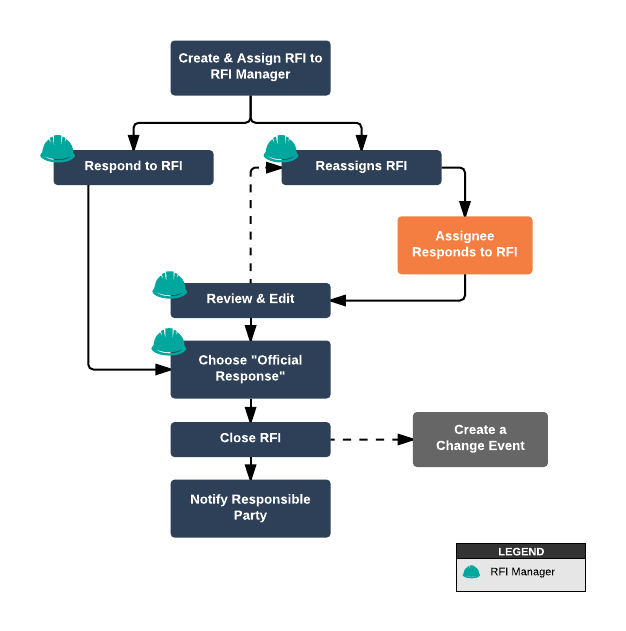
In SiteSpecs, RFIs help project teams communicate, request clarifications, collect answers, and track decisions. Each RFI can be assigned to specific people, include supporting documents, receive multiple responses, and have an official answer recorded before it is closed.
To access it, open your project and select RFIs from the project menu.
What is an RFI?
An RFI is typically issued to:
- Confirm the intent of a specification, a drawing detail, or a note on the drawings.
- Document a field directive.
- Request information not provided in the drawings or specifications.
Each RFI includes:
- RFI Manager: The person responsible for managing the RFI.
- Assignees: People responsible for providing an answer.
- Responses: Answers and comments submitted by assignees or other participants.
- Official Response: The response selected as the formal answer.
- Ball in Court: Indicates who is currently responsible for taking action.
- Distribution: People who receive copies of RFI notifications and updates.
- Due Date: The expected date for receiving an answer.
RFI statuses
| Status | Description |
|---|---|
| Draft | The RFI is being prepared and has not yet been sent to assignees. |
| Open | The RFI has been issued and is waiting for responses or further action. |
| Closed | The RFI has been answered and officially closed. |
Ball in Court
Ball in Court identifies the person or people currently responsible for taking action on an RFI.
It updates automatically as the RFI moves through its workflow. For example, responsibility may move between the RFI creator, manager, and assignees depending on who needs to provide the next response or take action.
This helps project teams quickly identify outstanding responsibilities and avoid delays.
How the process works